Setting up alerts you will actually keep
The scenario. You have been using the app a fortnight and your phone has started buzzing about things. The temptation is to turn notifications off entirely, which is the worst outcome — the useful ones go with the noise.
This is how to end up with two or three alerts you trust rather than ten you ignore.
1. Understand the two kinds
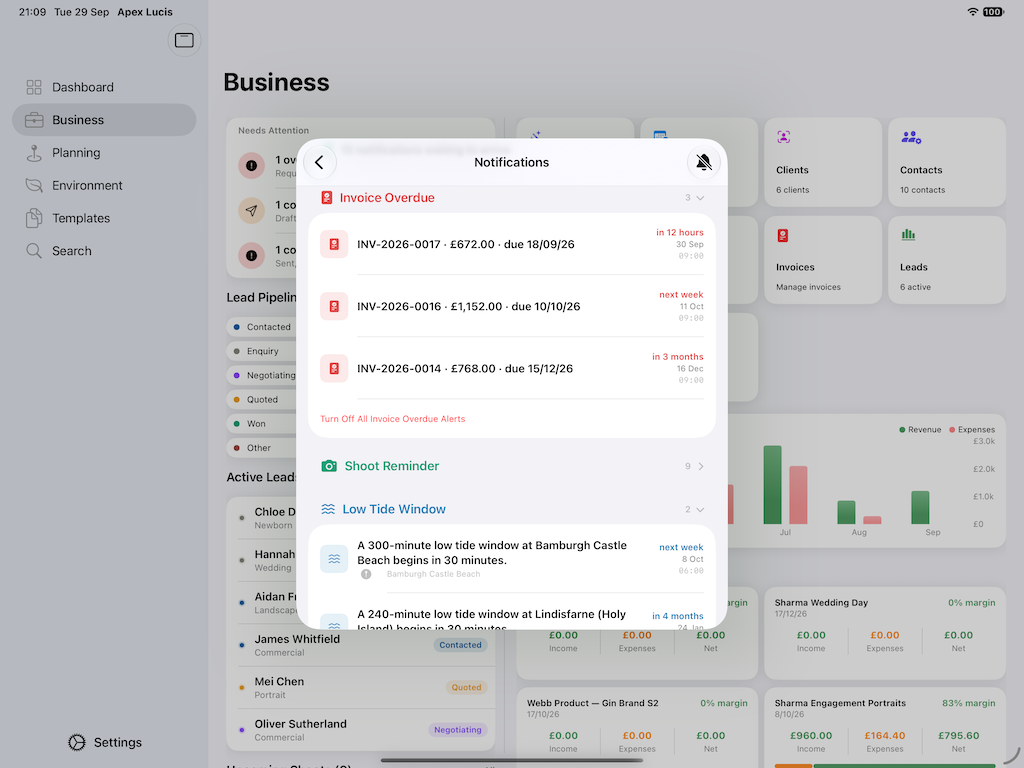
Apex Lucis has alerts about the business and alerts about the conditions, and they behave differently.
Business alerts are about time passing: an invoice going overdue, a contract still unsigned, a deliverable approaching its promised date. They are quiet, predictable, and worth leaving on — they fire rarely and every one is actionable.
Condition alerts are about the sky and the sea: golden hour approaching, low tide at a booking’s location, a tide cut-off, the aurora being possible. These are the ones that get switched off, because if you turn them on for everything you get told about every sunrise forever.
The rule that keeps them useful: switch condition alerts on per booking, not globally.
2. Set the timings once
Settings → Notifications
Decide how far ahead each kind fires. The defaults are sensible; the two worth thinking about are:
Shoot reminders. Far enough ahead to pack. The evening before is usually more useful than the morning of.
Golden hour. Long enough to get there. If your locations are forty minutes away, a fifteen-minute warning is an irritation rather than a prompt.
3. Choose per booking
On a booking → Alerts
This is where the noise is controlled. For each shoot, switch on only what that shoot needs:
- A coastal shoot at dawn: low tide and golden hour, and the tide cut-off if the place has one
- A studio day: neither — nothing outdoors is relevant
- A wedding: the shoot reminder, and golden hour if you are planning couple portraits by it
A booking with the right two alerts is worth more than a global setting with ten.
4. The one that is not optional
Tide cut-off, if you have set a safe height on a coastal location.
Every other alert is a convenience. This one is about not being cut off by a rising tide on a causeway or a beach with a single exit. If you shoot places like that, leave it on.
5. Aurora, if you are far enough north
The aurora alert is worth switching on only if it can actually reach you. Whether it can depends on your geomagnetic latitude, which is not the same as the one on a map — and the app works out the smallest storm strength that would bring it to your location.
For much of the world the honest answer is that no storm on the scale reaches, and you will simply never get the alert. Further north it is one of the few genuinely time-critical things in photography: the aurora does not wait, and a couple of hours’ notice is the difference between the photograph and reading about it.
6. Expect each device to behave separately
This is the one that produces confusion, so it is worth stating plainly.
Alerts are per device. Each of your devices works out its own from your synced data. That is deliberate — an alert is a local thing, and one device being asleep should not mean the reminder never happens.
The consequence: silencing an alert on your phone does not silence it on your Mac. If you want quiet, use the system’s own controls, or switch the alert off on the booking, which affects every device because the booking syncs.
7. Prune after a month
Come back to Settings → Notifications after a few weeks and ask one question of each alert type: did I act on it, or dismiss it?
Anything you consistently dismissed is noise. Switch it off. An alert you ignore is worse than no alert, because it teaches you to ignore the others.
Modules used
| Module | Guide |
|---|---|
| Notifications | Notifications |
| Bookings | Bookings |
| Locations | Location Scout |
| Tides | Tides |
| Light & Sky | Light & Sky |