Bookings
Overview
Bookings are the core of your photography business in Apex Lucis. A booking represents a confirmed (or tentative) shoot engagement, linking together the client, location, crew, equipment, invoice, contract, and environmental conditions all in one place.
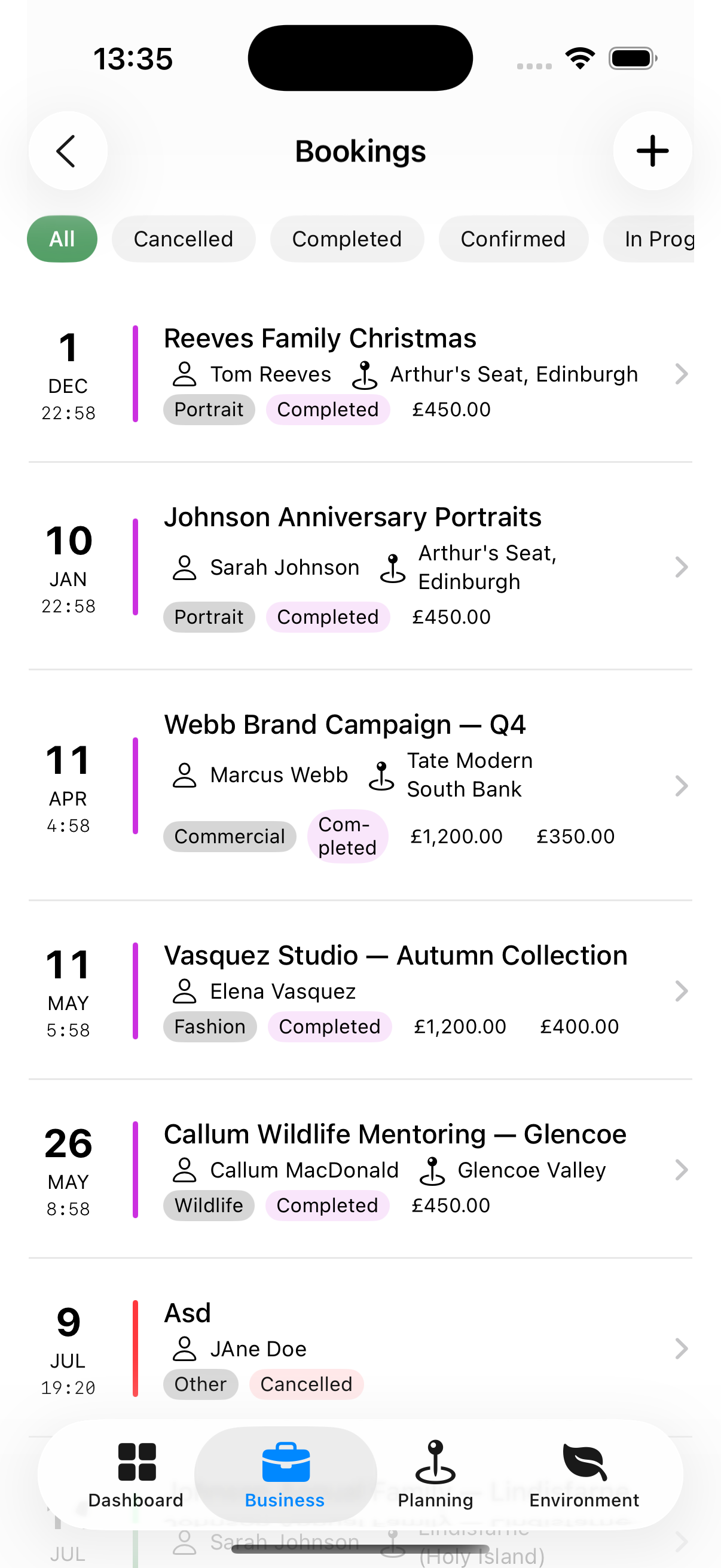
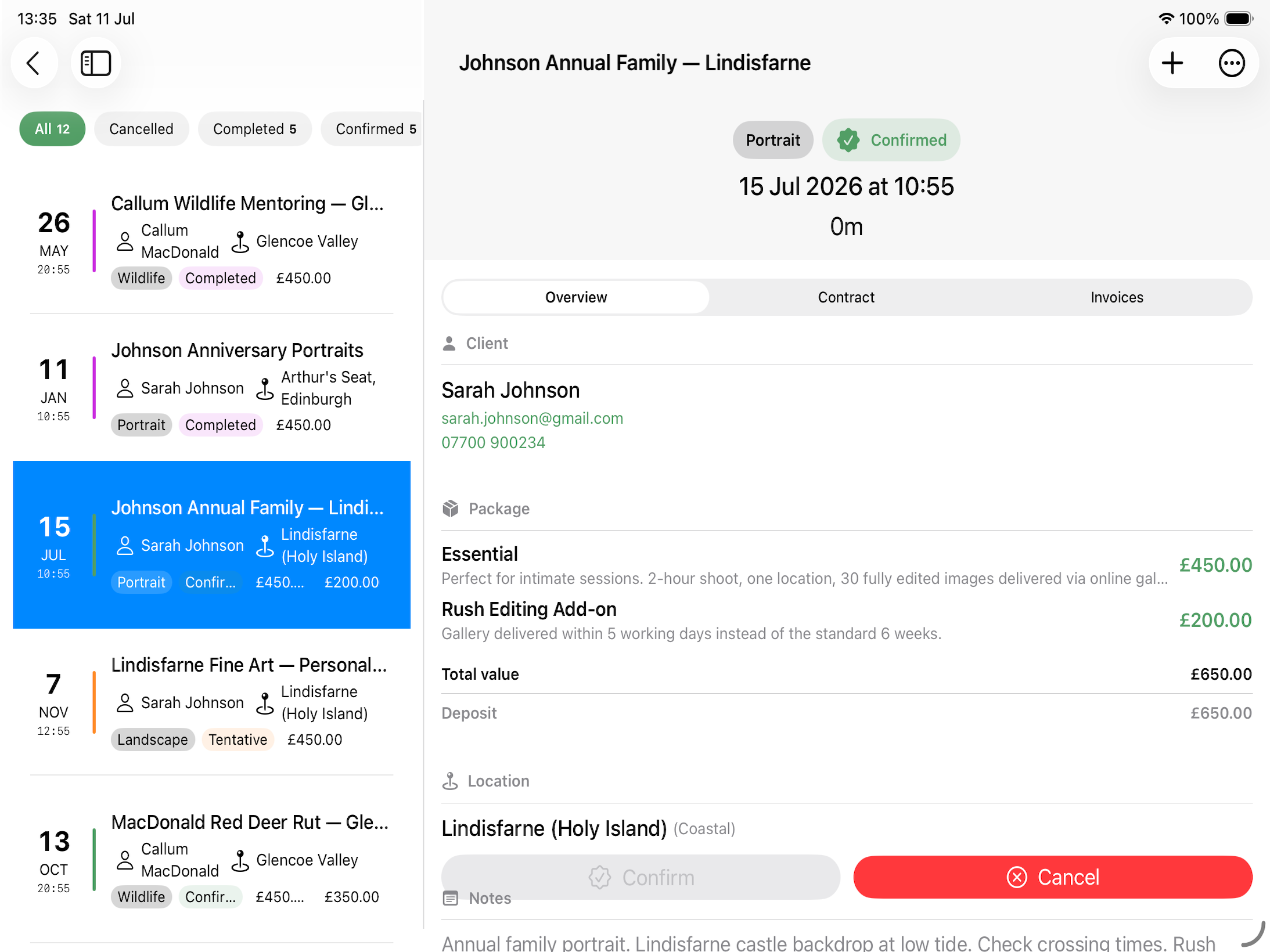
Booking Statuses
| Status | Meaning |
|---|---|
| Tentative | Pencilled in; not yet confirmed by client |
| Confirmed | Client has agreed; shoot is going ahead |
| In Progress | Shoot day is today or actively happening |
| Completed | Shoot is finished |
| Cancelled | Shoot will not go ahead |
A booking can move between most statuses freely — if you mark one Completed by mistake, you can set it back. The one move Apex Lucis will not make is Completed → Cancelled: the shoot happened, and cancelling it would erase a job you worked and invoiced while leaving the money behind it untouched. If it was completed in error, put it back to Confirmed; if it should never have existed, delete it.
Accessing Bookings
Business tab → Bookings
Bookings are split into three sections:
| Section | Holds |
|---|---|
| Upcoming | Shoots still to come, soonest first |
| Completed | Shoots you have marked Completed, most recent first |
| Other | Cancelled shoots, and ones whose date has passed while still marked Tentative, Confirmed or In Progress |
Other is the one worth checking. A shoot sitting there with a date last month and a status of Confirmed is usually a job that was worked and never closed off — often one you have not invoiced.
A booking leaves Upcoming when it finishes, not at midnight — a shoot ending at 14:48 has moved on by mid-afternoon. One that is currently running stays under Upcoming until its end time passes, and an all-day booking stays there for the whole of its day.
Cancelled bookings never appear under Upcoming, whatever their dates say — they are not events that will happen. They sit under Other so they can still be found and reinstated, and the Cancelled chip filters to them.
Use the filter chips at the top to filter by status (All / Tentative / Confirmed / In Progress / Completed / Cancelled). Each chip counts every booking with that status, across all three sections.
Rows that need attention
A row carries a badge when something on that booking is waiting on you:
| Badge | Means |
|---|---|
| Overdue | An invoice on this booking is past its due date |
| Not sent | A contract has been drafted but never sent to the client |
| Needs signing | The client has the contract and has not signed it |
| Permit | A permit for this shoot is expiring or has expired |
| Undelivered | Something on this booking is past the date the client was given |
| Review | The job is finished and nobody has asked the client for a review |
| Next year | Photographed nearly a year ago, and worth asking about next year |
Contract and permit badges appear only while the shoot is still to come — once the wedding has been photographed, an unsigned contract is a filing job rather than something to chase before Saturday. An Overdue badge shows whatever the date, because after the shoot is exactly when the money is owed.
Review and Next year are opportunities rather than problems, so they are marked in the accent colour rather than in red, and a row carrying one alongside a real problem names the problem first.
The counts under Needs Attention on the dashboard and the badges here always agree, so a count of two means two badged rows to find.
Creating a Booking
- Tap + (top right)
- Fill in:
- Title (required) — The name of the booking
- Client — Select from your Clients list or create new. Leave it as None for a scouting trip or a personal project
- Shoot date/Time
- Status — Default is Tentative
- Package — Select a pricing package (optional; you can price individually)
- Location — Select from your saved locations
- Notes
- Notifications — which alerts this booking should raise. See Notifications
- Tap Save
After creating a booking, you can add crew, shot lists, permits, invoices, and more.
Booking Detail Screen
The booking detail screen is the central hub for a shoot. It is broken down into five areas:
- Overview - The most important information about the booking.
- Detail - This is where you will find the Shoot Conditions, Shoot Lists, Call Sheets, Permits, Crew Rosters and Studio information.
- Contract - Here you can generate and view contracts.
- Invoice - A quick view of the invoices associated with the Booking. You can update their status here, and see the Invoice Detail.
- Delivery - What this shoot owes the client, how far each item has got, and the two messages you send once it is done.
Costs & Charges
What the shoot cost to put on, and what it made, on the booking’s own page.
The card appears on the Overview once any expense names this booking — studio hire, crew fees, travel, permits, or anything you entered by hand.
| Line | What it is |
|---|---|
| Each category | What went out, grouped the way your expenses are |
| Total cost | The lot, added up |
| Packages | What the client is paying for the work itself |
| Recharged to client | Costs being billed on, at what you are charging for them. Any markup is shown beside it |
| Total charged | Packages plus recharges |
| Margin | The difference, with the percentage beside it |
Underneath, two running notes: how much is still to recharge, and how much has been recovered. A cost moves from one to the other when the invoice carrying it is sent — see Recharging a booking’s costs.
Disclaimer: Apex Lucis provides this as information. Always consult an accountant before declaring your finances.
Shoot Conditions
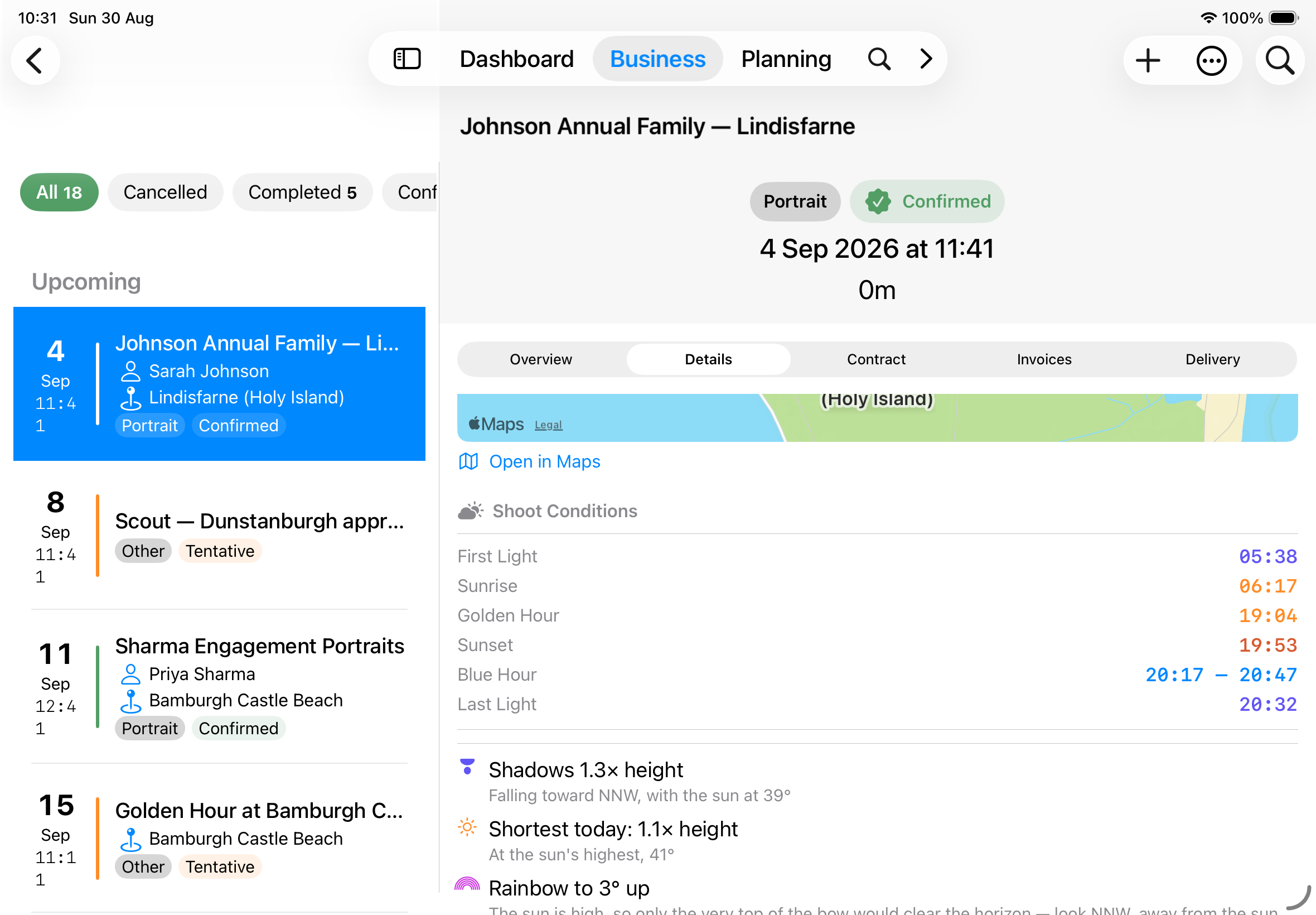
On the Detail tab, for any booking with a location: the whole day’s light, in the order it happens.
| Row | What it is |
|---|---|
| First Light | The sky starts to colour, around twenty minutes before the sun appears |
| Sunrise | The sun clears the horizon |
| Golden Hour | The evening’s warm light begins |
| Sunset | The sun goes down |
| Blue Hour | The window either side of dusk, shown as a span |
| Last Light | Usable light is gone |
A row you would need a torch for is simply absent — above the Arctic Circle in midsummer most of them are.
Below the light: how long shadows will be at the time of the shoot, whether a rainbow is possible, the moon’s phase and how much of it is lit, the day’s high and low tides for a coastal location, and the shoot score if one has been worked out.
The shadow figure is given as a multiple of height, and for the hour you are actually shooting rather than for noon — where the shadows fall decides a composition, and it is a different answer at 09:00 than at 16:00. A rainbow always sits 42° from the point opposite the sun, so the card also says when the sun will be too high for one to be possible at all. See Shadows & Rainbows.
Tide Cut-Off
Set a Safe Height on a coastal location and any booking there gains a warning card: when the water reaches your limit, how long that leaves you, and when it drops back below.
| Line | What it tells you |
|---|---|
| Water reaches your limit | The time, and the countdown to it |
| Rate beside it | How fast the water is rising, in metres per hour |
| Clears | When it falls back below your height |
| High water | The peak this pair sits either side of, and how high |
If the tide is not forecast to reach your height that day, the card says so rather than showing nothing.
Open the booking while the water is already over your limit and the card leads with Water is over your limit and the time it clears, which is the number you need at that point.
The card names the tide station the reading came from and how far away it is. The further off it is, the less it says about the water in front of you.
Warning: The rate is how fast the water is rising, not how fast it is coming towards you. On flat sand the waterline can advance far quicker than the height suggests.
Disclaimer: A tide prediction does not account for weather, surge or the shape of the ground, and the water can arrive sooner than this. Check official local tide tables and safety advice before relying on it. See Settings → Disclaimer.
Sky Outlook
For a booking with a location, how good the light is likely to look rather than only when it arrives.
Colour on shoot day scores sunrise and sunset out of ten with the reason underneath — high cloud to catch the light and a clear horizon for it to arrive along is what you want, and the card names which of the two is the risk. It appears for shoots the hourly forecast reaches, and is absent further out rather than guessed at.
Northern Lights — or Southern Lights below the equator — appears only where your location is far enough from the equator to have a real chance. It gives the Kp forecast for that night’s dark hours and the strength needed at your latitude for a glow on the horizon and for the oval overhead.
Both are explained in full on the Light & Sky page.
Note: Space weather is only forecast a few days ahead, so a booking months out shows the threshold for your location but no forecast yet.
Shoot Day Page
Pro Required: The Shoot Day Page needs an active Apex Lucis Pro subscription. The card stays on the booking without it and shows the upgrade screen in place of the button.
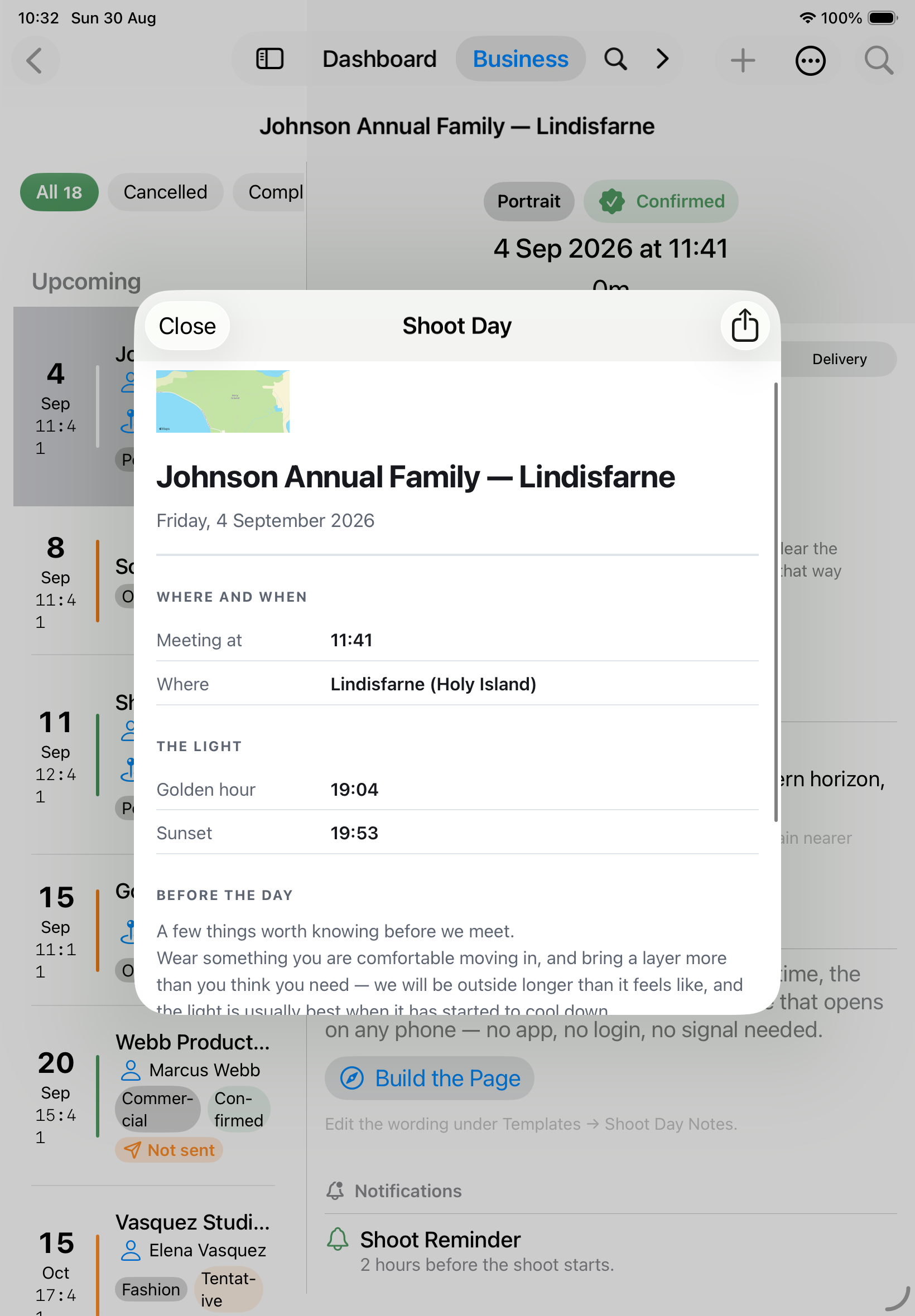
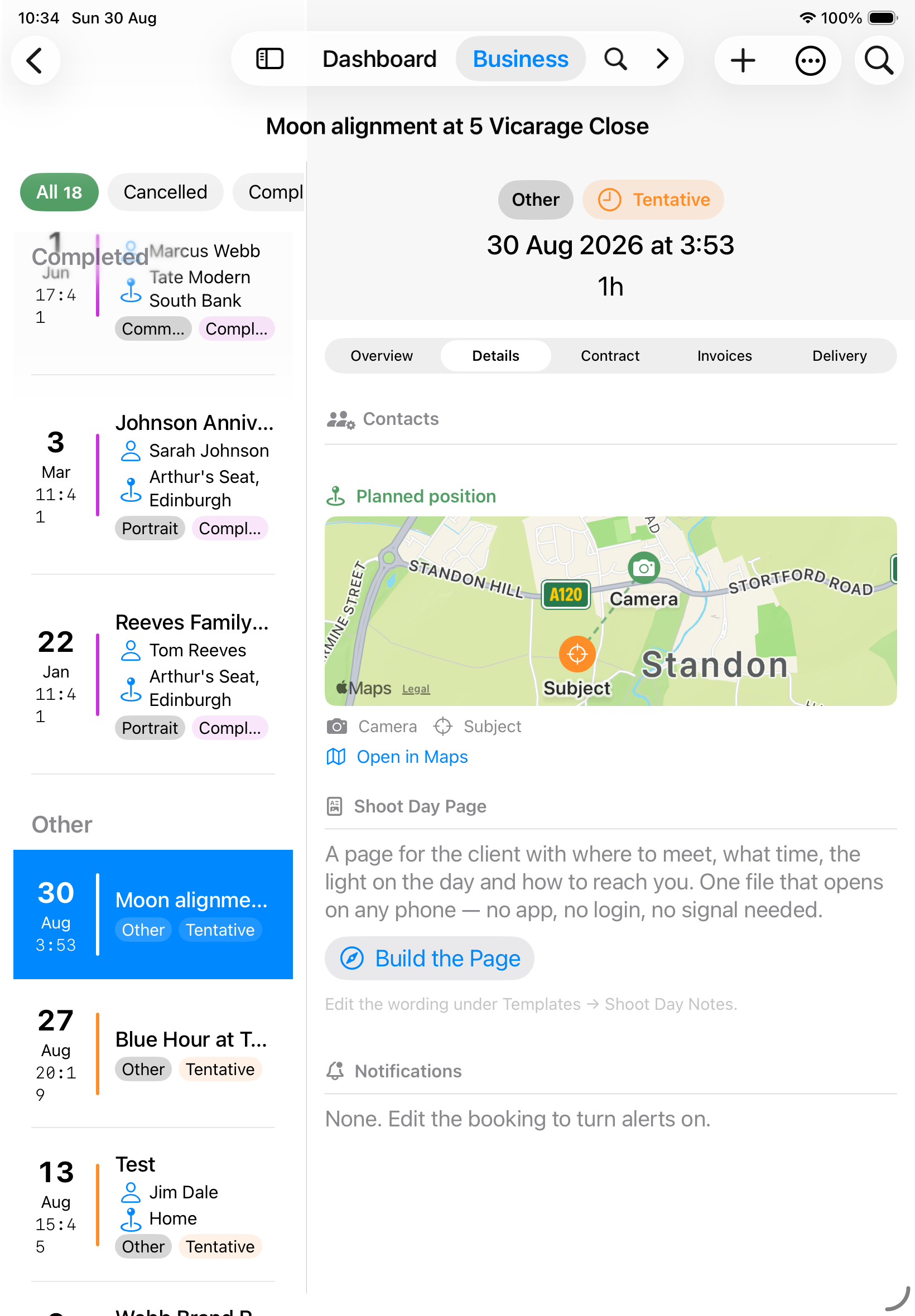
A page for the client with where to meet, what time, the light, and anything you have told them. Build the Page makes it; Share sends it however you would send a photograph — Messages, Mail, AirDrop, or saved to Files.
It is a single self-contained file. There is nothing to log into, nothing to install, and it opens on any phone, so it works for the parent of the bride as readily as for an art director.
| On the page | Where it comes from |
|---|---|
| Date, start time and how long | The booking |
| Where to meet, with a map | The booking’s location |
| Sunset, golden hour and the rest | Worked out for that place and date |
| Your phone number and email | Settings → Company |
| Anything you want to say | The Shoot Day Notes message template |
The wording of the notes is yours to edit under Templates → Shoot Day Notes — parking, what to wear, when to arrive.
Tip: The sunset time is the part worth leaving in. Being asked to meet at half six in September is being asked to trust a judgement, and the sunset time turns that into an explanation.
Where You Planned to Stand
A booking made from Moon Alignment shows a small map with two pins — where the camera goes and what it points at — and a dashed line between them.
Tap Open in Maps for directions to the camera position. The subject is what you point at, not what you drive to.
A booking made from Optimal Windows, or any booking with a location, shows that place instead. A studio booking with no location shows no map at all.
Signing a Contract
A contract you have sent can come back signed on paper, or be signed in front of you on the device.
From the contract’s ⋯ menu, Sign on This Device opens a panel to sign on. Sign with a finger, a stylus or an Apple Pencil — anything that draws on the screen works, and on a Mac you sign with the trackpad or mouse.
The signature is stored with the contract and printed on every copy of the PDF from then on. Signing also marks the contract Signed, because a contract carrying a signature but still reading “sent” would be two records of the same fact disagreeing — and its chase-up reminder stops.
Where a contract came back on paper instead, Mark as Signed records that without a signature image.
Tip: Sign it while the client is in front of you, at the end of the pre-shoot meeting. A contract chased by email for three weeks is the commonest reason a booking is still not really booked.
Delivery
What the client is still owed, one item at a time. A wedding might owe an online gallery in a fortnight, an album in three months and a USB whenever it is posted — each keeps its own dates, so you can send things as they become ready.
The button above the cards offers the packages sold on this shoot that have nothing recorded against them yet — it names the package when there is one, or counts them when there are several. Add something else covers everything that was never a line item — a bonus reel, a reprint, a thank-you print.
Each item carries:
Name What it is, in the words you would use to the client — “Online gallery”, “30×30 album”, “USB”.
Status Not Started → Imported → Culled → Edited → Delivered → Archived. **Mark
Promise a date Switch it on and Apex Lucis offers a date based on the turnaround agreed on that package, or your house default. Once given, it stays as it is — a date a client has been told is a fact about that conversation. An item past its date is marked Past the date the client was given.
Gallery link Where the client collects it. Open checks it goes where you expect.
Asking for a review, and asking about next year
Once every item on the job has been handed over, Ask for a review appears at the bottom of the tab. Eleven months after the shoot, so does Ask about next year. Either one opens your mail app with the message already written, the client addressed and your details filled in — read it over, change anything you like, and send.
The wording is yours to edit under Templates, and the review link comes from Settings → Company.
Both also appear on the Dashboard under Needs Attention: a review a week after the job finished, next year’s enquiry once the booking is nearly a year old. Each is offered for a while and then steps aside, so the card stays a list of things worth doing this week.
Duplicating a Booking
For a repeat client, an annual job, or a shoot running over several days. Open the booking, choose Duplicate Booking from the ⋯ menu, and pick a date — Next day, Next week, Next year, or anything you like.
| Carried across | Not carried across |
|---|---|
| Client, location, packages, contacts | Invoices, contract, delivery items |
| Notes, shoot type, the shoot’s length | Shot list, call sheet, trip, permit, crew, studio |
| Your alert choices for light, conditions and tides | The calendar event — the copy gets its own |
The copy arrives Tentative with its Shoot Reminder switched off, because its date is a placeholder until you agree one. Turn the reminder on once the date is real.
Apex Lucis opens the copy as soon as it is made, so you can change the title or the client straight away.
Note: The original keeps everything. Duplicating never moves a shot list or a call sheet off the booking you copied.
Editing a Booking
Tap the Edit button (pencil icon, top right) to open the edit sheet. Change any field and tap Save.
Nothing is written until you tap Save. Cancel discards every change you made in the sheet and leaves the booking exactly as it was; if you have unsaved changes, Apex Lucis asks before throwing them away. Save is greyed out until there is something valid to save.
Cancelling a Booking
Open the booking and tap Cancel in the action bar, or set the status to Cancelled in the edit sheet. Apex Lucis asks to confirm first, and tells you whether the booking’s calendar event will be removed.
Cancelling a booking:
- moves it out of Upcoming and into Other
- removes its calendar event, if it had one
- cancels its scheduled alerts, so a cancelled shoot stops reminding you about itself
It does not cancel invoices or notify the client.
Warning: Cancelling is reversible — set the status back to Confirmed and the booking returns to your diary. The calendar event does not come back on its own; use Sync Calendar from the ⋯ menu, or confirm the booking again. No automatic communication is sent to the client. You must contact them separately.
Deleting a Booking
A booking can only be deleted once it has been cancelled. Cancel it first, then use Delete Booking from the ⋯ menu on the booking’s detail screen.
The two-step route is deliberate: a booking is the spine of a job, with invoices, a contract, a calendar event and a shoot plan hanging off it, and cancelling first is a deliberate step that is reversible right up until the delete.
Apex Lucis tells you what deleting costs before it happens:
| What | Happens |
|---|---|
| Issued invoices (sent, paid, overdue, refunded) | Kept. They stop pointing at a booking, and their figures stay in your Profit & Loss |
| Draft invoices | Deleted. A draft has never been sent to anyone and is not owed |
| Draft contract | Deleted. It was never sent, so nobody outside the business has a copy |
| Sent or signed contract | Kept. It records an agreement that was made, so deleting the shoot does not undo it |
| Shoot plan | Deleted |
| Calendar event and alerts | Removed |
A kept contract stops belonging to any booking, so it will not show on a booking screen again. Find it under Needs Attention on the dashboard, which offers to attach it to another shoot or delete it.
If money is still outstanding on an issued invoice, the confirmation says so and names the amount. Cancelling a shoot does not cancel a debt — a retained deposit or a cancellation fee is often owed because the booking was cancelled. If it is genuinely not owed, void the invoice rather than deleting the booking to make it disappear.
On iPhone and iPad, Cancel and Delete are on the booking’s own detail screen, not on a swipe from the list. Both are decisions worth opening the booking for. On a Mac they are also available from the right-click menu in the list.