Using Apex Lucis without opening it
The scenario. You check what time golden hour is. Then you check it again. Then you are in a car park paying for parking and you know perfectly well you will not record it. Then someone asks when your next booking is.
None of that deserves unlocking a phone and navigating an app. This is how to set it up so none of it does.
1. Put the answers on the Home Screen
Long-press the Home Screen → add a widget → Apex Lucis
The ones worth having:
The next booking — time, client and place, without opening anything.
Today’s light — first light, golden hour and sunset for the location you care about.
The tide, if you work on a coast.
Pick the location deliberately when the widget offers it. A light widget pointed at your home town is much less useful than one pointed at the stretch of coast you actually shoot.
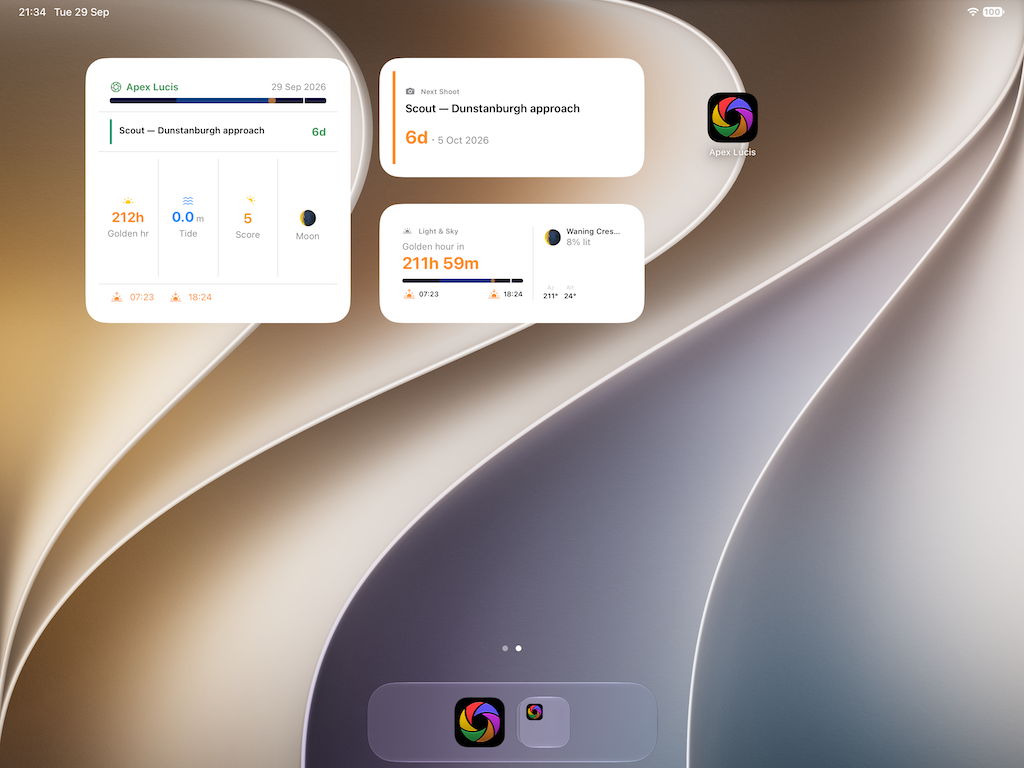
They are on iPad and on the Mac too, where a light widget beside your editing window is arguably more use than on the phone.
2. Put the live ones on the Lock Screen
Live Activities are for something happening now, and photography has several worth running.
The light window. A countdown of how long is left of golden hour. During a shoot the question is never when it started.
The tide, as it turns, when you are working to a state rather than a clock.
The call sheet, on a shoot with a schedule — the current slot and what is next. This one is interactive: tick a slot off from the Lock Screen without opening anything, which is the difference between a schedule that gets kept and one abandoned by ten in the morning.
There is also a Control Centre control for golden hour, for days you want it one swipe down.
3. Teach Siri the four things worth asking
Settings → Shortcuts, or the Shortcuts app
Four are set up ready to use:
“What’s the golden hour at Bamburgh?”
“Add an expense”
“What’s my next booking?”
“Start my shoot”
The second one is the one that pays. The single biggest reason photographers under-claim expenses is that recording one requires sitting down, and you never sit down. Saying it out loud while walking back from the ticket machine takes four seconds, and it is the difference between claiming your travel and estimating it in April.
4. Find things from the phone’s own search
Bookings, clients, locations and invoices are indexed into Spotlight.
Swipe down on the Home Screen, type a client’s name, and their booking is there — no opening the app and finding the right tab. It works the way email and messages do, which is the point: the thing you wanted is one search away rather than four taps into a hierarchy.
Nothing to set up. It happens as records are created.
5. Build your own, if you want
The Shortcuts are built on App Intents, which means they compose with everything else on the phone. Some combinations worth knowing are possible:
- A shortcut that runs when you arrive at a location and shows its conditions
- A “heading out” shortcut that reads the next booking aloud and starts a driving focus
- An automation that asks about expenses when you disconnect from CarPlay
None of it is required. But if you already build automations, the pieces are there.
Why this matters more than it sounds
Every one of the above is something a browser-based tool structurally cannot do. A web app cannot put a widget on your Home Screen, cannot run a Live Activity on your Lock Screen, cannot answer Siri, and cannot appear in Spotlight.
It matters most in exactly the conditions photographers work in: outdoors, one-handed, in a hurry, often with no signal. An app that needs a browser and a connection to tell you what time sunset is has failed at the moment you needed it.
All of it is free — none of this is part of the subscription.
Modules used
| Module | Guide |
|---|---|
| Widgets | Widgets |
| Shortcuts | Shortcuts |
| Bookings | Bookings |
| Expenses | Expenses |
| Light & Sky | Light & Sky |