Expenses
Overview
Track every business cost — from travel and permits to gear purchases and studio hire. Apex Lucis categorises expenses, tracks which are tax-deductible, and includes them in P&L reports.
Expense Categories
Default categories (configurable in Settings → Expenses):
- Travel
- Permits
- Gear / Equipment
- Meals
- Accommodation
- Other
You can add custom categories in Settings.
Accessing Expenses
Business tab → Expenses
Adding an Expense
- Tap +
- Enter:
- Description (required)
- Amount (required)
- Date
- Category
- Supplier — who you paid
- Booking — the shoot this cost was for, if it was for one
- Tax deductible — Toggle on if this expense can be claimed against tax
- Reimbursable by client — Toggle on if the client is paying this back. See Charging a cost to a client
- Notes (optional)
- Tap Save
Naming the booking is what puts a cost on that shoot’s Costs & Charges card, and what lets you recharge it on the booking’s invoice. A cost with no booking is still tracked and still counts towards your P&L; it just belongs to the business rather than to a job.
Charging a Cost to a Client
Turn on Reimbursable by client and two more fields appear:
| Field | What it does |
|---|---|
| Charge client | What the client pays for this cost |
| Markup | The same thing as a percentage on top of what you paid |
Fill in either one and the other follows. A cost is charged at what it cost you unless you change it — a £750 studio hire billed at £900 is a 20% markup, and you can type it whichever way round you think about it.
The expense keeps what you actually paid, so your P&L reads cost £750, revenue £900, and £150 made on the recharge.
Tip: Set a Default markup % in Settings → Business and it is applied the moment you mark a cost reimbursable. Changing it later never re-prices a cost you have already entered.
Recovered
A reimbursable cost is outstanding until the invoice carrying it is sent. The Expenses header keeps a running Reimbursable total of what is still to come back to you.
Add the cost to a draft invoice from its Items section and nothing changes yet — a draft is a proposal. Mark that invoice Sent and the cost becomes Recovered. Void the invoice and it goes back to outstanding. See Recharging a booking’s costs.
For a cost settled outside the app — one the client paid you directly, or one you billed on paper — swipe the expense and tap Mark Recovered. Mark Not Recovered puts it back. The option appears only on costs marked reimbursable, since there is nothing to recover on anything else.
Mileage Expenses
If you drove to a shoot, add a mileage expense:
- Tap + → Select Mileage
- Enter the distance (miles or km, depending on your Distance Unit setting)
- The app automatically calculates the cost at your configured mileage rate (default: HMRC rate for UK users)
- Tap Save
Tip: The default mileage rate (UK: 45p/mile) matches current HMRC approved rates. Update it in Settings → Expenses if your rate differs in your country.
Importing Expenses
Tap the Import button to pull in costs you’ve already entered elsewhere in the app — trip accommodation and travel legs, studio hire, crew fees, and permit costs — and turn them into tracked expenses. Each item can only be imported once; anything already imported is marked and excluded from the list.
Expenses Overview
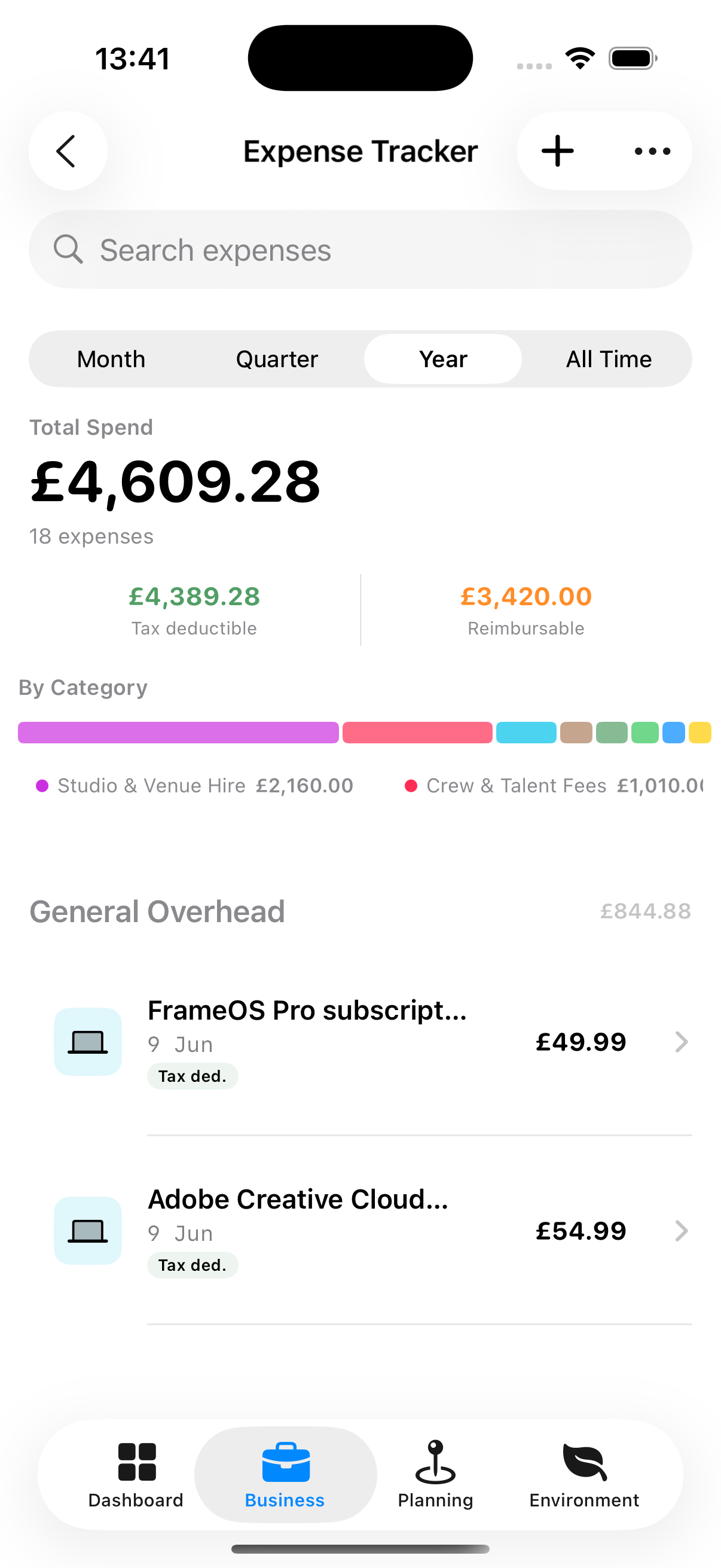
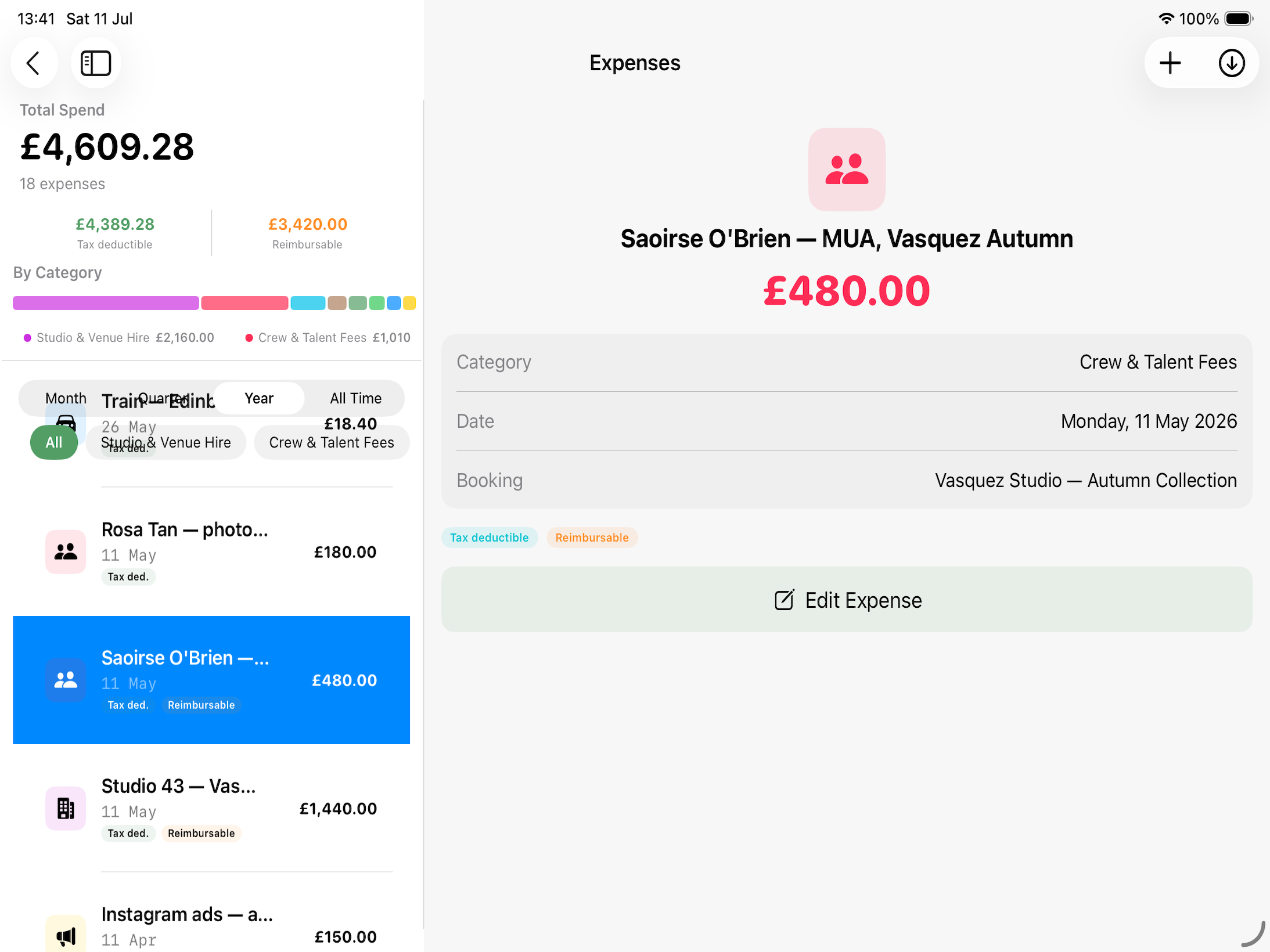
The main Expenses screen show any recorded expenses. You can filter this based on Month, Quarter, Year, All Time.
Across the top are three running totals for the period you are looking at: Total Spend, Tax deductible, and Reimbursable — what clients still owe you back.
Disclaimer: Whether a cost is claimable, and at what rate, depends on your circumstances. Always consult your accountant before making a claim.