Running a wedding day
The scenario. A July wedding, a second shooter, a make-up artist arriving early, two venues, and a family group list the bride has emailed you. This is how that becomes one booking rather than nine browser tabs.
1. The booking is the spine
Business → Bookings → New
Client, date, package. Set the ceremony venue as the location so the booking carries the light for that day — which for a July wedding decides when the golden-hour couple portraits actually happen, and it is usually later than the schedule the venue suggests.
Check the sunset time now, before agreeing a timeline with anyone.
2. Who is coming, and what they cost
On the booking → Crew
Add your second shooter and the make-up artist from your contacts — the people you work with, kept separate from the clients who hire you.
For each: their role, their agreed fee, and whether a model release is needed. Recording the fee here is what puts it in the job’s costs later, which is the difference between knowing what the wedding earned and knowing what it made.
Crew and call sheets are Pro features.
3. The list the bride sent you
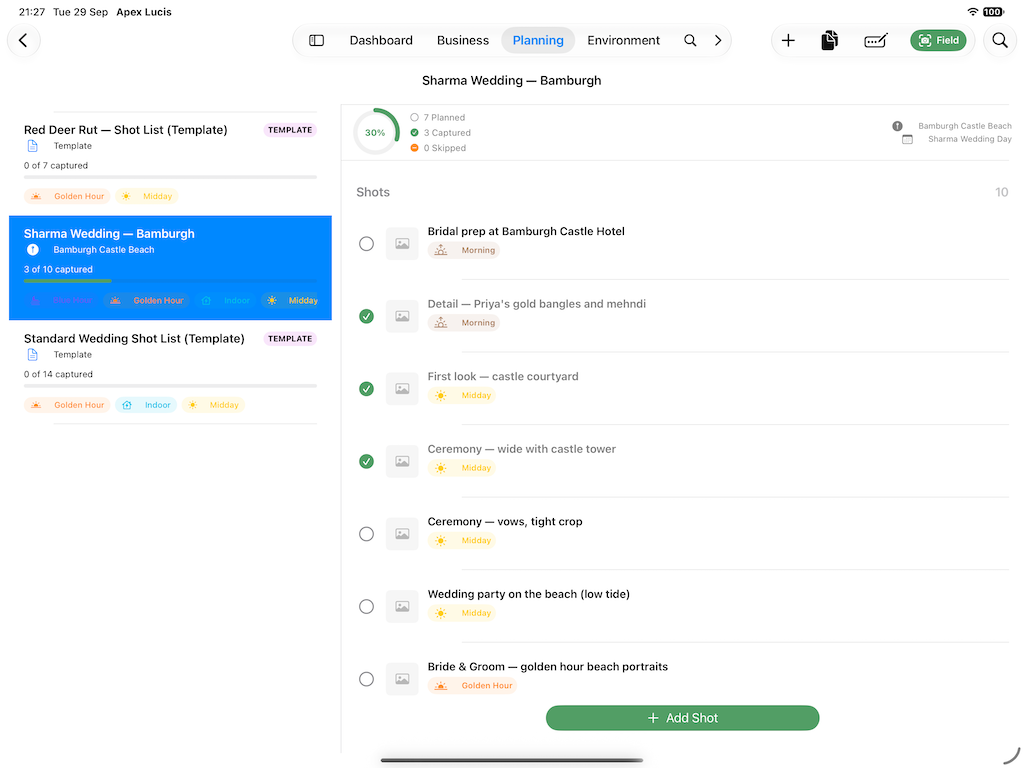
On the booking → Shot List
Put the family groups in. Keep it to subjects rather than compositions — “Bride with her grandmother” not “three-quarter, 85mm, backlit”.
The value is not the list you wrote a fortnight ago. It is knowing at 4pm, with the light going, which three groups you still have not photographed.
4. The day, in blocks
On the booking → Call Sheet
Build the day as time slots: make-up from 09:00 at the house, ceremony 13:00 at the church, drinks 14:00, portraits 18:30 for the light you looked up in step 1.
Each slot carries its own times, its location, who is needed, and optionally the shot list for that block. The make-up artist called for 09:00 who is not needed until 11:00 has wasted two hours and will remember it.
Export it as a PDF and send it to everyone. There is also a self-contained page you can send instead, which opens on any phone without an app or a login — often more use to a make-up artist reading it once in the car.
5. Paperwork, before the day
On the booking → Documents
The contract, and model releases for anyone who needs one. Releases generate as PDFs so you can produce one on location and have it signed there — which is the only time it reliably gets done.
On the booking → Invoice
Deposit and balance as separate amounts. For a wedding the balance is usually due before the day; whichever you choose, the due date is what later makes it visible if it slips.
6. On the day
Open the booking. The call sheet tells you what block you are in, the shot list is tickable, and the light times are there without signal.
If you run a Live Activity for the light window, the countdown sits on the Lock Screen — how long is left of golden hour, which is the question during a shoot rather than when it started.
7. After
On the booking → Delivery
A wedding usually owes more than one thing — an online gallery, and often an album months later. Each becomes a deliverable with its own promised date, taken from the turnaround on the package you sold.
The gallery goes out in a fortnight; the album takes three months because it needs their choices and a supplier. Two promises, tracked separately, rather than the client waiting ten extra weeks for the gallery because the album set the date.
When everything is delivered, ask for the review. A few days after, while they are still pleased.
Modules used
| Module | Guide |
|---|---|
| Bookings | Bookings |
| Crew | Crew |
| Shot Lists | Shot Lists |
| Call Sheets | Call Sheets |
| Packages | Packages |
| Invoices | Invoices |
| Templates | Template Manager |