Light & Sky Planner
Overview
The Light & Sky Planner is Apex Lucis’s most powerful environmental tool. It calculates the precise position of the sun, moon, and Milky Way for any location, date, and time — using a built-in astronomical engine that works entirely offline.
Accessing Light & Sky
- Environment tab → Light & Sky
- You can jump straight into Light and Sky from the Location Detail screen.
Controls
At the top of the screen:
- Date picker — Navigate to any date (past or future)
- AR View — See the location of the Sun and Moon
- Sun/Moon Position Map — (see below)
What Is Displayed
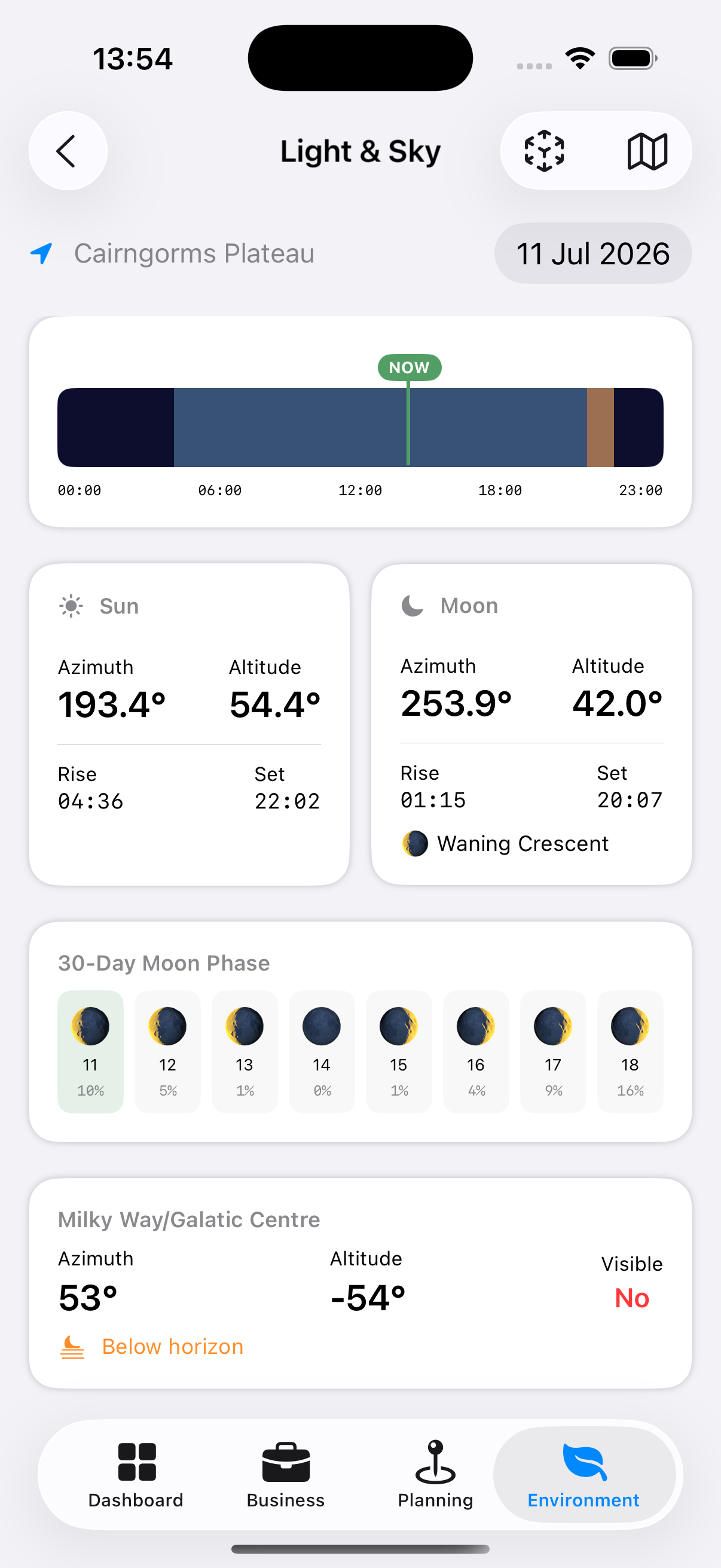
Day Timeline
A horizontal bar visualising the whole 24-hour day at a glance:
- The background is dark navy, representing night.
- A light blue band overlays the stretch between sunrise and sunset — daytime.
- An orange band overlays the run-up to sunset — the evening golden hour.
- If you’re viewing today’s date, a bright vertical NOW marker shows exactly where you are in the day.
- Hour labels (00:00, 06:00, 12:00, 18:00, 23:00) run along the bottom for reference.
Because the bands are layered, the point where orange overlays blue near the right-hand edge of the day is golden hour itself — the last stretch before sunset.
Sun Detail View
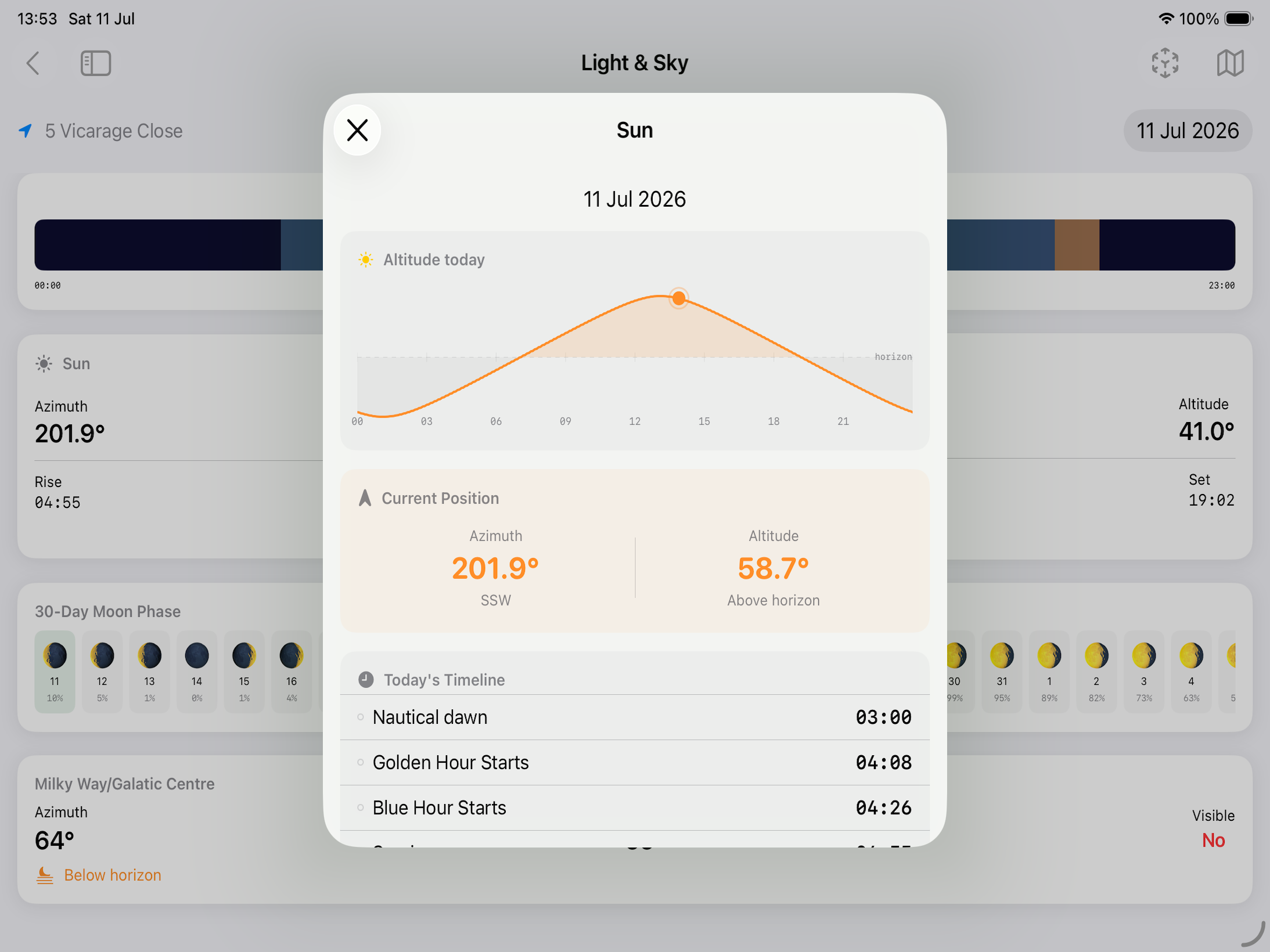
Tap the Sun card to open the Sun Detail sheet:
- 24-hour sun position chart
- Current azimuth and altitude
- Astronomical dawn
- Nautical dawn
- Blue hour starts (morning)
- Civil dawn
- Golden hour starts (morning)
- Blue hour ends (morning)
- Sunrise
- Golden hour ends (morning)
- Solar noon
- Golden hour starts (evening)
- Sun sets
- Blue hour starts (evening)
- Golden hour ends (evening)
- Civil dusk
- Blue hour ends (evening)
- Nautical dusk
- Astronomical dusk
Moon Detail View
Tap the Moon card to open the Moon Detail sheet:
- 24-hour moon position chart
- Moon phase name (New, Waxing Crescent, First Quarter, etc.) and illumination percentage
- Moonrise and moonset times
- Current azimuth and altitude
- Moon age (days since new moon)
- Days until full moon
- Days until new moon
Colour Forecast
Not what time the sun rises or sets, but how good it will be. Sunrise and sunset each get a score out of ten and a word — Poor, Fair, Good or Excellent — with the reason in plain terms underneath.
A sunset needs two things at once, and they pull against each other: high cloud to catch the light, and a clear horizon for the light to arrive along. The forecast says which of the two is the risk:
- “High cloud to catch the light, and a clear horizon for it to arrive along” — the one you want
- “Almost no high cloud — nothing up there to catch the colour”
- “Low cloud on the horizon will block the light before it reaches anything”
- “High cloud is thick enough to work as a lid rather than a canvas”
- “Very humid, so expect haze to mute whatever colour there is”
Beneath each row it lists what the forecast holds at low, medium and high level, so you can see where the cloud sits rather than only how much of it there is.
The card appears for the days the hourly forecast reaches. Further out there is no cloud-by-layer to read, so it is absent rather than guessed at.
Tip: A low score is as useful as a high one. It is the difference between setting an alarm for 05:00 and having a lie-in.
Northern Lights
For locations far enough from the equator, a card giving tonight’s chance of aurora. It appears where there is a real chance to report and stays hidden everywhere else — the same card reads Southern Lights below the equator.
What it shows
Kp — the strength of the geomagnetic activity forecast, on a scale of 0 to 9. The card gives the peak expected during tonight’s dark hours rather than the highest figure in the feed, because a storm at noon tomorrow is not a reason to stand outside this evening.
The two thresholds for where you are — the Kp needed for a glow on the horizon, and the higher one needed for the oval to reach overhead. These depend on your geomagnetic latitude, which is not the same as the latitude on a map: Scotland sees aurora at a Kp that shows nothing at all in Moscow, which sits further north.
Whether it will be dark enough. In midsummer at high latitude there is no astronomical night, and the card says so rather than promising a display nobody could see.
Note: Space weather is only forecast a few days ahead. Check again nearer the time.
Tip: “On the horizon” means a pale glow low in the sky that a camera picks up long before your eyes do. Point the lens north and take a test frame even when you cannot see anything.
Shadows & Rainbows
Two things the sun’s position tells you directly, for the time you have selected.
Shadow length as a multiple of height — a person 1.8m tall casting a shadow “3.2 × height” is casting one about six metres long. It also gives the shortest shadow of the day, at solar noon, which is the moment to avoid for portraits and the moment to seek for a shot straight down.
Rainbow — where one would appear if it rained. A rainbow always sits 42° from the point directly opposite the sun, so when the sun is low the arc stands tall, and once the sun climbs past 42° no rainbow is possible at all. The row gives how far up the arc would reach, or says plainly that none can happen.
Tip: The best rainbows are the ones you drive towards. Sun low behind you, a shower ahead, and the arc will be at its tallest.
Moon Phase Strip
At the bottom of the screen, a horizontal strip shows the moon phase for the next 30 days. Tap any day to jump to that date.
Milky Way Visibility
When the Milky Way is visible from the selected location on the selected night, Apex Lucis shows:
- Rise time of the Galactic Centre
- Transit time (when it crosses the meridian — the best position for photography)
- Set time
- The azimuth of the Galactic Centre at peak altitude
Note: Milky Way visibility depends on moon phase (the moon must be below the horizon or very close to new), time of year, and latitude. Apex Lucis calculates all three.
Tip: For a visual compass panorama of the Milky Way’s band across the sky — rather than these raw figures — see the Milky Way card on the Environment overview screen.
Sun and Moon Position Map
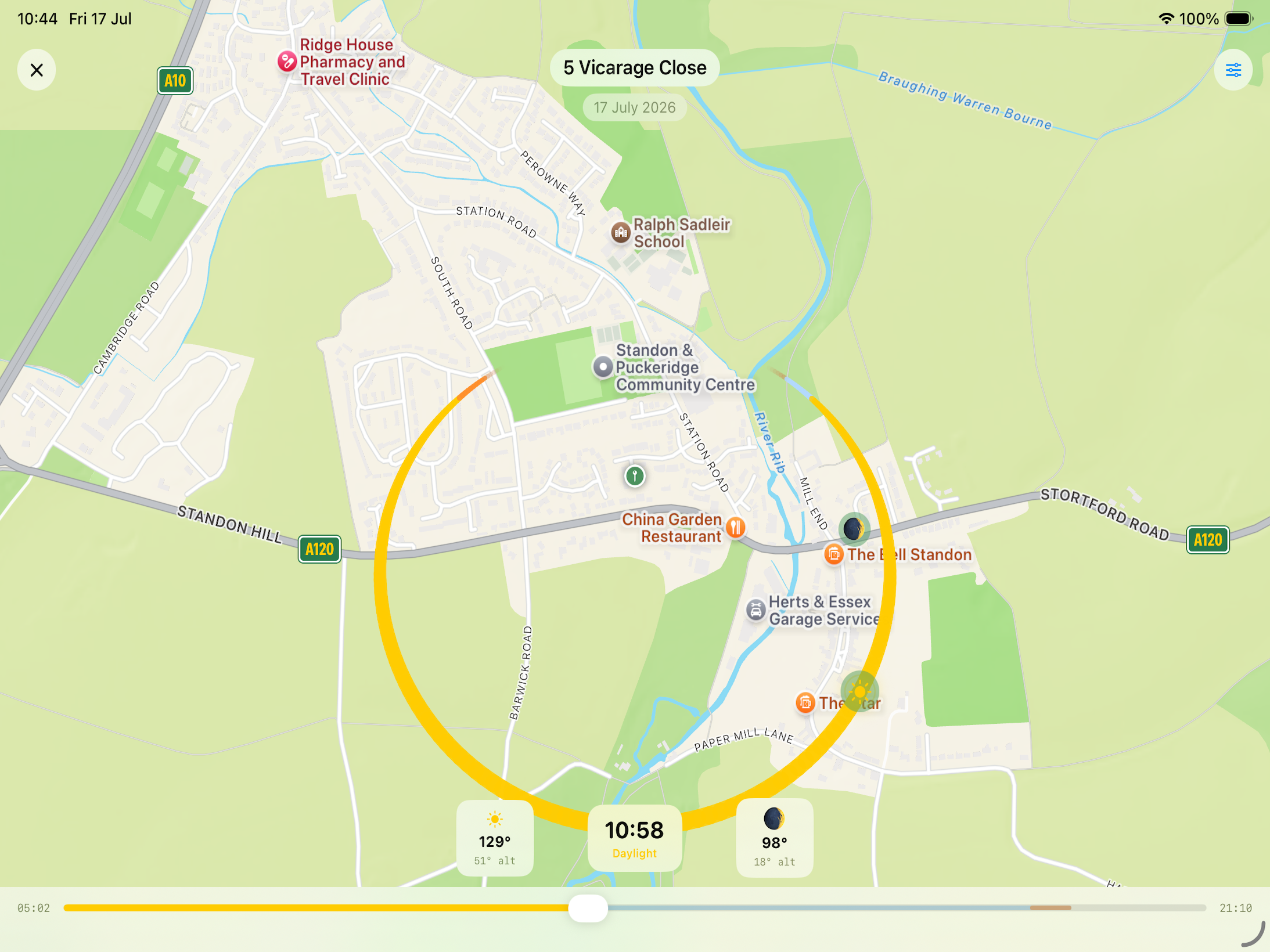
A full-screen view of an actual map, centred on your location’s pin, with the sun’s path across the sky that day drawn as an arc sweeping out from the pin in true compass directions.
How to read it:
- Arc width encodes altitude — the arc is thickest where the sun is highest in the sky, tapering to nothing at the horizon.
- Arc colour encodes light quality — it shifts through night, twilight, golden hour, daylight and blue hour tones along its length, so you can see at a glance where the good light falls.
- Sun and moon icons sit on the arc at their exact position for the selected time.
- Slider — drag the slider along the bottom to scrub through the full 24-hour period; the icons move along the arc live as you drag.
- Moon toggle — show or hide the moon’s position independently of the sun’s.